


How to connect Claude to WordPress
Connect Claude Desktop or Claude Code to your site with HyIMPACT. Then Claude can build pages, fix SEO and set up tags on your site, and every change is logged.
“List the tools from my WordPress server.”
| Content | Posts, pages, menus, media |
| Builder | Elementor elements, classes, variables |
| SEO | Titles, meta, schema, redirects |
| GA4, Ads and Tag Manager tags | |
| Safety | Production mode on · writes logged |
On this page
Before you start
- A WordPress site on HTTPS, with HyIMPACT installed
- An administrator login
- Claude Desktop or Claude Code on your computer
- Node.js, unless you use Claude Code’s direct HTTP setup
Step 1: Turn on AI abilities
In WP Admin, open HyIMPACT → Configuration. Tick "Turn on AI Abilities for this site" and choose Save Settings. Your browser asks you to confirm: choose OK. Steps 2 and 3 appear once the setting is saved.
Example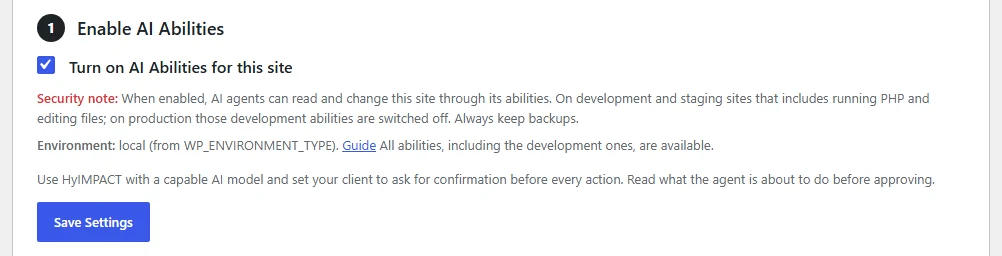
Step 1 on a test site. The Environment line shows how HyIMPACT reads the site. On production the development abilities stay off. Step 2: Create an application password
Under Application Password, choose "Generate application password". HyIMPACT creates the password for your user, shows it once and adds it to the setup text in step 3. To tell your passwords apart later, first open "Customize password name (optional)" and name it after the tool, for example “Claude on laptop”.
Example
The new password (masked in this screenshot). Treat it like a password. Don’t share the setup text, and revoke the password under “Manage existing application passwords” if it leaks.Step 3: Add the server to Claude
Claude Code
Under Connect Your AI Client, choose "Copy prompt" and paste the text into Claude Code. Claude writes its own config and checks the connection.
Example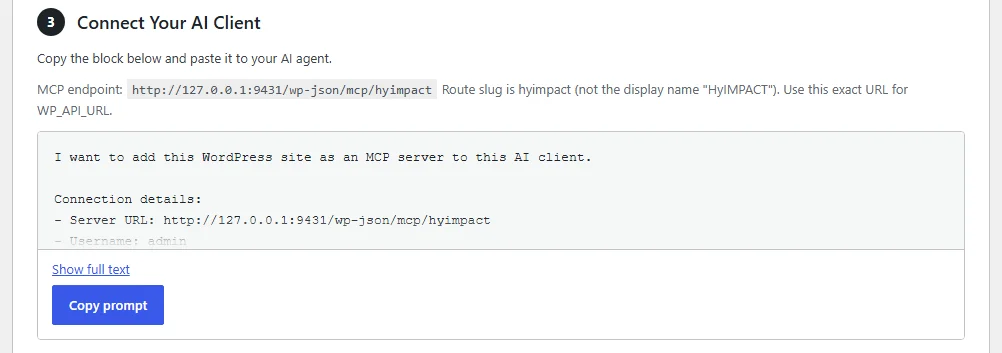
The setup prompt and its endpoint. Or open “Need the JSON config for a specific client?”, choose Claude Code and run the command it shows in your terminal.
Example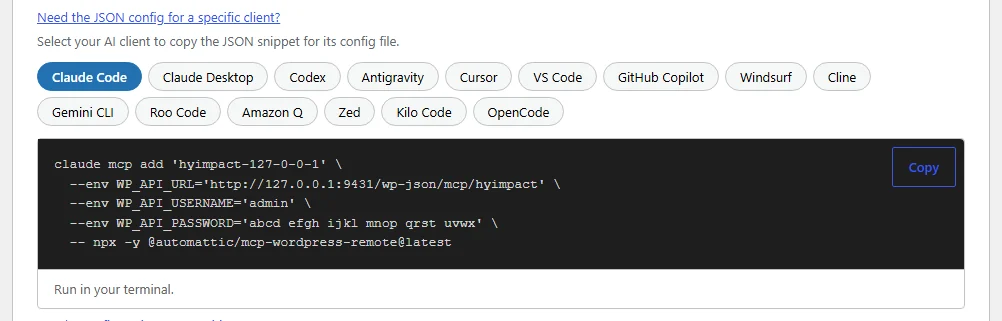
The Claude Code command (password masked). On Windows the command uses macOS and Linux line breaks, so PowerShell rejects it. Run it in Git Bash, or use "Copy prompt" instead.Claude Desktop
Open “Need the JSON config for a specific client?” and choose Claude Desktop. Add the snippet to Claude Desktop’s config file. If the file already lists servers, put the new entry inside
mcpServersnext to them.- macOS
~/Library/Application Support/Claude/claude_desktop_config.json - Windows
%APPDATA%\Claude\claude_desktop_config.json
Example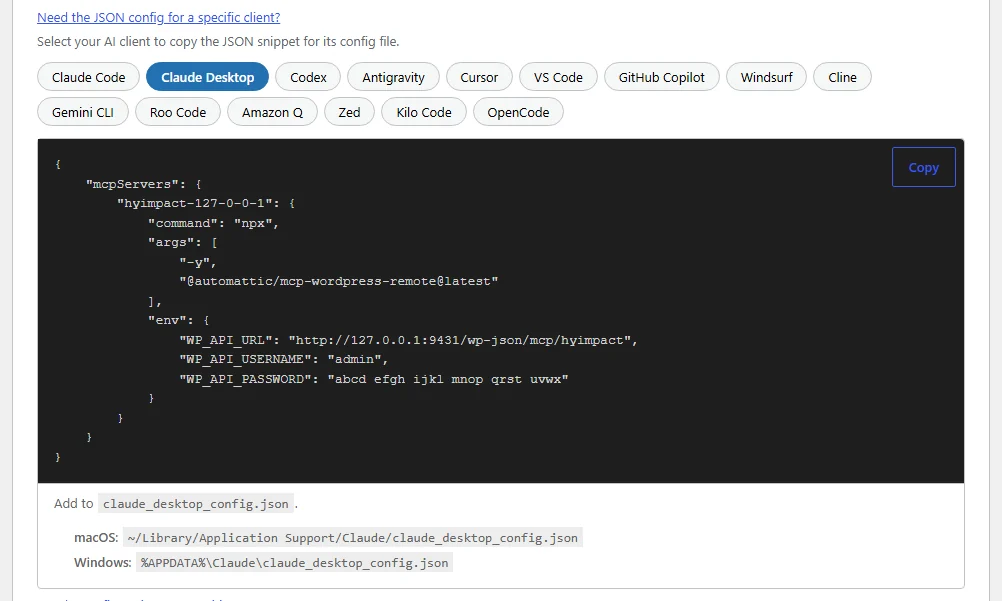
The Claude Desktop snippet (password masked). No Node.js?
Open “Need a configuration not requiring npx?” and pick Claude. This snippet connects over HTTP without Node.js. It goes in a project’s
.mcp.jsonfile, which Claude Code reads. For Claude Desktop, use the snippet above.- macOS
Step 4: Restart and test
Quit and reopen Claude Desktop, or start a new Claude Code session in the project. Then ask:
- “List the tools from my WordPress server”
- “Which pages does my site have?”
HyIMPACT shows your AI three tools: discover abilities, get ability info and execute ability. Through them it reaches every ability the site has. A new WordPress site has one page, “Sample Page”.
Common errors
- “Unauthorized” or 401A security plugin may block application passwords. Allow them for your user, then create a new one.
- Application passwords are missingWordPress only offers them on HTTPS sites. Add HTTPS first. On a local site over HTTP, HyIMPACT shows the line to add to wp-config.php:
define('WP_ENVIRONMENT_TYPE', 'local'); - The command fails in PowerShellThe Claude Code command is written for macOS, Linux and Git Bash. On Windows, run it in Git Bash or paste the setup prompt into Claude Code.
- Certificate errors on a local siteHyIMPACT spots a local self-signed certificate and adds a setting for it to the setup.
- Wrong addressThe endpoint ends in /wp-json/mcp/hyimpact. Use the exact address from the Configuration page.
- No tools, or a timeoutRestart Claude: it loads new servers on start. The first start takes longer while npx downloads the connector, and a slow site can time out the first check. Wait a minute and try again.
What about claude.ai in the browser?
Claude in the browser needs a connector we’re building. Use Claude Desktop or Claude Code today.
Try these first prompts
- “Audit the SEO titles on my 20 most recent pages and list the weak ones.”
- “Make a draft copy of the About page in Elementor with a shorter intro.”
- “Show me the last 10 changes in the HyIMPACT audit log.”
Claude questions
Does it work with a Claude Pro or Max plan?
HyIMPACT works with Claude Desktop and Claude Code on the plans that include them. Check your plan on Anthropic’s site.
Is it safe to connect Claude to a live site?
On production, HyIMPACT keeps the risky tools off and logs every change. Read about security
Can Claude manage several sites?
Yes. Add each site as its own server with its own name.
Do I need a new password for each AI tool?
It’s best. With one password per tool or computer you can revoke one without cutting off the others.
Explore more
Connect Claude step by step
The setup text comes from HyIMPACT → Configuration on your own site.